Generate Poster Blog
Christmas Poster Ideas 2026: Gifts, Pets and Winter Scenes
2026-10-09
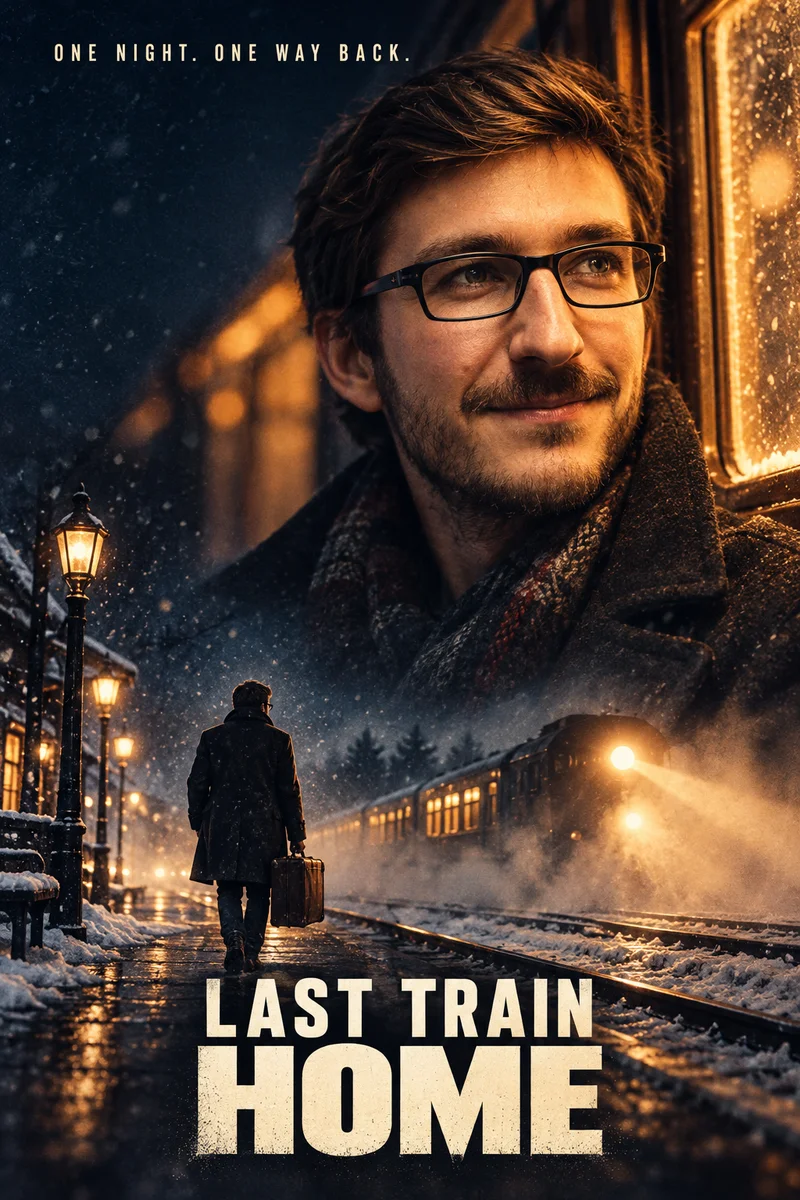
A Christmas poster for 2026 can be a personal keepsake, a welcoming picture for a festive room or the artwork behind a small gathering invitation. Start with the person or moment you want to celebrate, then choose a visual direction that belongs to them. A snowy street alone is seasonal; the street where someone grew up, their dog or a favourite colour makes it personal.
These ideas focus on digital artwork you can create and check yourself. They do not assume that everyone celebrates in the same way or that a generated face will be perfect. You can make a portrait-led gift, an illustration without a photo or a quiet winter scene. Use the Christmas poster maker to start with a festive direction, and arrange any printing separately.
Christmas Poster Maker 2026: Five directions worth making your own
1. A winter-film portrait
Put one person at the centre of an imagined winter film: soft street lights, an evening coat and a familiar neighbourhood. Keep the face readable and choose one recognisable detail rather than a crowd of festive props. Leave a calm area for a title you will add later. This works as a gift when the scene reflects the recipient's taste, not just the season.
2. A pet as the holiday star
A dog or cat can carry the whole image. Start from a clear pet photo, then choose a knitted scarf, a quiet doorway or a small pile of wrapped presents. Avoid covering the eyes or changing the animal's distinctive markings. A minimal background keeps the pet recognisable. Review paws, ears and accessories at full size before choosing a result to keep.
3. A place that means home
Use a town square, a favourite walking route or a remembered cabin as the emotional anchor. Describe the setting from your own memory rather than asking for a precise architectural copy. Warm windows and a restrained pine-and-cream palette can convey Christmas without a large slogan. Keep any actual address or private detail out of a publicly shared version.
4. A quiet festive-room print
For decoration, skip the portrait and build a still life around two or three objects: a candle, a branch and a ribbon, for example. Choose colours that suit the room where the poster will hang. Leave space around the objects and use one illustration style throughout. This direction also suits people who prefer a winter mood to explicitly religious imagery.
5. Artwork for a small gathering
Create the background first, then add the host's own invitation wording. Keep the title short and reserve a separate area for the day, time and location. A beautiful scene with unreadable details is a poor invitation. Test a small phone-screen version as well as the print crop, and send the text separately if guests need reliable searchable information.
Three prompts to adapt
Original Christmas railway-adventure movie poster of the uploaded person. Recognizable large face above a snowy station, one train and a traveller with a suitcase. Midnight blue, amber and ivory, deliberate photographic poster composition with clear space for a title. No lettering or logos.
Festive illustrated portrait of the uploaded pet beside a softly lit doorway. Keep the animal's distinctive markings, visible eyes and natural proportions. One red knitted scarf, a few wrapped presents, warm cream background and subtle paper texture. Leave uncluttered space for a caption. No text or brand marks.
Minimal Christmas still-life poster: one candle, a pine branch and a loose red ribbon on warm ivory paper. Refined screenprint illustration, generous negative space, restrained forest green and muted red. Portrait 2:3 composition with a clear upper area for wording added separately. No letters or numbers.
From idea to a usable poster
Choose the person, room or gathering this poster is for before you choose a visual style. Open the seasonal generator, keep the recommended direction or replace it with one of the prompts below, and add a clear portrait if the image should feature someone specific. A photo is optional for decorative artwork. Create an account to generate your first free preview; no card is required.
Review the face, composition and empty space before adding exact wording. Change one element at a time if the result misses your intention. Keep the original download, then use a layout editor for names, dates and invitation details. Paid posters create new variations rather than an identical enlargement of the preview. Check the current package and included features on the pricing screen; printing and framing are separate arrangements.
For a portrait, the photo-to-movie-poster guide explains the upload workflow. The poster design guide helps with busy backgrounds, crops and visual hierarchy. Prompts describe an intended direction, not a guaranteed result. A simple scene usually gives you a clearer starting point than a long list of unrelated effects.
Choose a photo that gives the face room
Use the original, sharpest portrait you can find, with both eyes visible and even light across the face. A natural phone photo near a window is a better starting point than a tiny screenshot with a heavy filter. Start with one person so the intended subject is unambiguous.
Check the source at full size. If eyelashes and the outline of the mouth are already blurry, cropping tighter will not restore them. Avoid sunglasses, hands across the face and dramatic shadows hiding half the features. Leave some space around the head: the final poster may need a different crop from the source.
Choose a photo the recipient actually likes. A technically sharp picture that catches an awkward expression is a weak gift reference. For a surprise, use a photo you can appropriately upload; a publicly visible portrait is not a reason to disregard the person's wishes. If you only have a group shot, crop to the intended recipient first.
Plan Christmas 2026 around the finished gift
Christmas Day falls on Friday, December 25, 2026. The US holiday calendar confirms that date, but your recipient may exchange gifts or gather on another day. Use their actual plans as the deadline. Work backwards from when you need the finished gift in hand, including time for generation, checking the text, a print proof and a frame.
There is no universal last-order date for this workflow. Generate Poster supplies digital artwork, while a printer's production and delivery times are separate. Confirm those with the shop you choose. If time is short, a carefully presented digital poster with a personal note can be more thoughtful than an unverified rush print. Keep a copy without the year when you want the artwork to stay useful after the holiday.
Check the file before choosing a frame
Check pixel dimensions and aspect ratio before choosing a frame. A tall 2:3 file fits an 8 × 12 inch or 20 × 30 cm shape, while A4 and A3 use different proportions. Fitting a 2:3 image onto those paper sizes requires a border or a crop; stretching it changes the face.
For a planning example at 300 pixels per inch, multiply each print dimension in inches by 300. These are calculated targets, not a promise of Generate Poster's output dimensions:
| Print size | Pixel target at 300 ppi | Shape |
|---|---|---|
| 20 × 30 cm | ≈2362 × 3543 | 2:3 |
| 30 × 45 cm | ≈3543 × 5315 | 2:3 |
| 8 × 12 inches | 2400 × 3600 | 2:3 |
| 12 × 18 inches | 3600 × 5400 | 2:3 |
| 16 × 24 inches | 4800 × 7200 | 2:3 |
Conversely, divide a file's dimensions by the planned print dimensions to calculate its effective ppi. A 2400 × 3600 image printed at 12 × 18 inches gives 200 ppi, rather than 300. Ask your printer whether that suits the paper and viewing distance. Adobe explains the relationship between image dimensions and printed size.
Frequently asked questions
Can I use a phone photo?
Yes. Choose the original phone photo with a clear, well-lit face rather than a screenshot or a compressed copy from a chat. One person is the simplest starting point. Review the generated face before downloading, because a good source photo helps but does not guarantee an exact likeness.
Is the paid poster an exact enlargement of the free one?
Do not expect an identical enlargement. A paid generation creates new versions, so details and composition can change. The free preview helps you explore the direction; inspect each paid result independently for likeness, unwanted text and print suitability before choosing the file for your gift.
How do I make names and dates accurate?
Ask for clear space in the artwork and add exact wording in a layout editor after downloading. Proofread spelling, accents and every digit. AI-generated lettering can contain mistakes; an attractive image is not proof that the invitation details are correct.
Can I order a printed poster here?
This guide creates a digital file. Arrange printing and a frame separately with a printer or shop, or request a print quote where offered. Check the actual pixel dimensions, final crop and confirmed turnaround before ordering; no delivery deadline is promised here.
When is Christmas Day in 2026?
Christmas Day is Friday, December 25, 2026. Your gift exchange or gathering may take place on another day. Confirm that date with the recipient and check a printer's turnaround independently; the digital generator does not guarantee Christmas delivery.
Make a gift that starts with your own idea
Create my Christmas poster. First preview free. Sign in to create; no card required.